
What Every Machine and Tool Actually Did
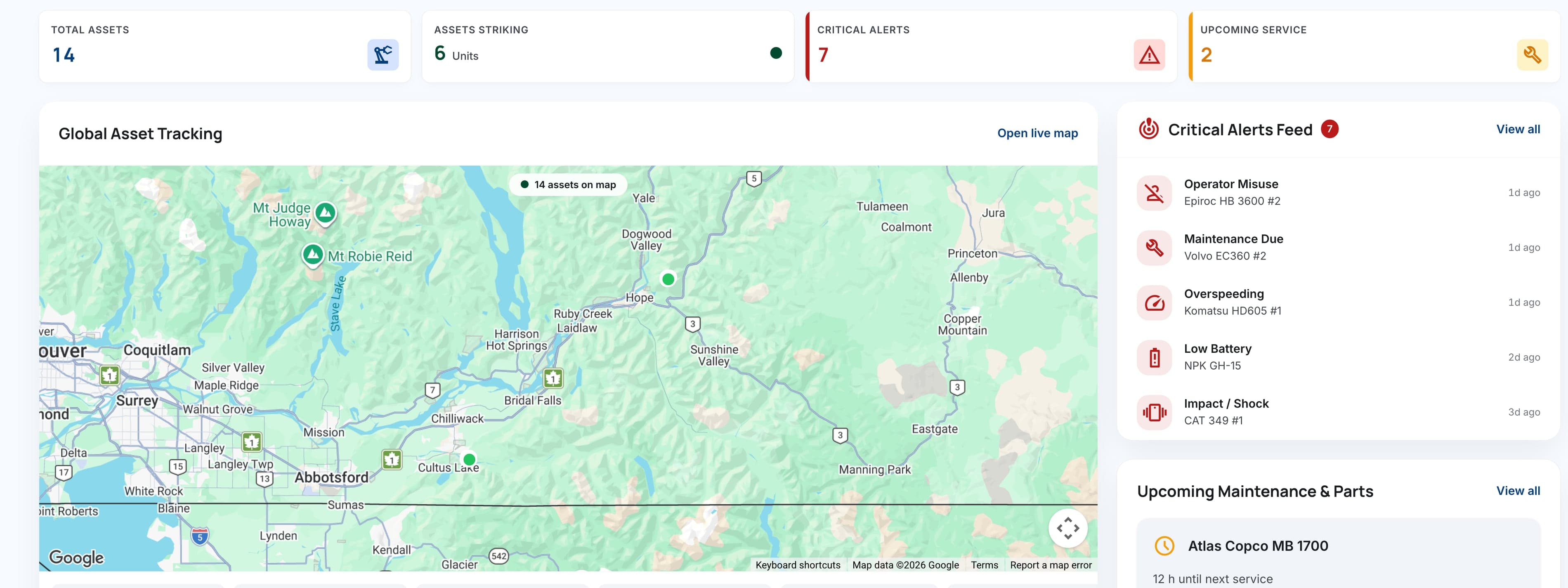
See each asset's latest reported location, recorded activity, assigned operating context and open requirements before the next shift. SolidTrack connects the equipment record with alerts, maintenance, field operations and SolidAI.
One Record.Every Angle On It.
The office, the workshop and the site normally hold three versions of the same week and spend the first hour of Monday reconciling them. Everything here reads off the same record, so the argument about whose number is right does not start.
Dashboard
What needs dealing with this morning
Live Map
Latest reported location and movement history
Alerts
The few things worth a phone call
Utilization
Recorded activity, inactive time and usage patterns
Inventory
Every asset, its papers and its history
The Morning Check, on One Screen
See which machines recorded activity, which remained inactive, which raised an alert and which are approaching a configured service requirement. The point is not another dashboard. It is a faster, shared morning check.
- Yesterday's work, by asset
- What was raised overnight
- What is close to a service
Live Map
Review each machine's latest reported location and movement history, then use sites and geofences to put boundary events into operational context.
- Latest reported location, subject to position availability
- Where it has been, not just where it is
- Filter a busy map down to what matters
Active Site: Sector 7A
Only the Things Worth Interrupting Someone For
An alerting system that fires all day gets muted. SolidTrack keeps configured exceptions visible, including geofence entry or exit, offline devices, low batteries, due or overdue maintenance, missed inspections and telemetry or usage-based anomalies.
The event and its context stay together
A boundary event, an offline unit and upcoming maintenance mean different things. Each alert keeps its type, timestamp and equipment context visible.
Available in-app and delivered by email
Alerts are available in-app and delivered by email today. Push notifications will come with the native iOS and Android apps. Open an alert to review the equipment context behind it.
What was known, and when
Each alert stays with its timestamp and equipment context, so teams can review what was known and when.
Utilization, breaker and attachment life, and service requirements
A breaker that recorded forty active hours in a fortnight and one that recorded four should not look identical in a maintenance review. Activity, utilization patterns, configured intervals and service history provide the context for planning the next action.
The overworked tool and the idle one, side by side
Two machines with the same hours can show different usage patterns. Intensity and duration sit beside the hour total to make that difference visible.
Wear you can see coming
A rising share of long firing bursts can indicate increased mushrooming risk and give the workshop a reason to inspect.
A service date the workshop believes
Configured intervals can use recorded activity so the maintenance plan reflects how the equipment has been used.
Usage Insight Across Assets and Teams
Breakers Performance
Compare breakers working in similar conditions to see where activity and impact patterns diverge. The difference gives operations and maintenance teams a focused place to investigate.
Operator Performance
When operators and shifts are assigned in advance, telemetry-derived blank-firing and impact-duration patterns can be compared as evidence for coaching and review.
Inventory
Every asset with its identifier, its category, its documents and when it last reported. The value is dull and real: the manual, the warranty and the service history are on the machine rather than in a folder on somebody's desk, so they survive that person leaving.
- Papers attached to the machine, not to a person
- You can see which units have gone quiet
- Attachments are assets in their own right
Maintenance
Plan work from recorded activity, configured service intervals and maintenance history. Due and overdue alerts keep the next requirement visible, while the record gives the workshop context for each decision.
- Due dates that move with real usage
- What was done last time, and by whom
- Enough warning to have the part on the shelf
Sites
Create sites and geofences, assign the equipment to monitor and track boundary events. Configure entry, exit or breach alerts when movement needs attention.
- Monitored equipment assigned to the right site
- Entry and exit boundary events in one record
- Breach alerts for movement that needs attention
SolidAI Assistant and SolidAI Hub
Ask SolidAI Assistant operational questions in plain language and review answers grounded in SolidTrack data. Use SolidAI Hub to compare equipment, assigned operators, sites and shifts, and bring those comparisons into company-level reporting.
- Guided operational insight
- Earlier risk interpretation
- Better decision support
AI Insight
“Breaker #1 (HB2000) spent 31% of this week in bursts over 40 seconds, against 9% for the other three on the same face. The pattern indicates increased mushrooming risk, and the tool is 60 recorded hours from its configured service. Review it with the assigned night shift and inspect before changing the service plan.”
See the Platform in Action
Book a walkthrough of SolidTrack and explore how the platform fits your assets, jobsites and maintenance workflows.